
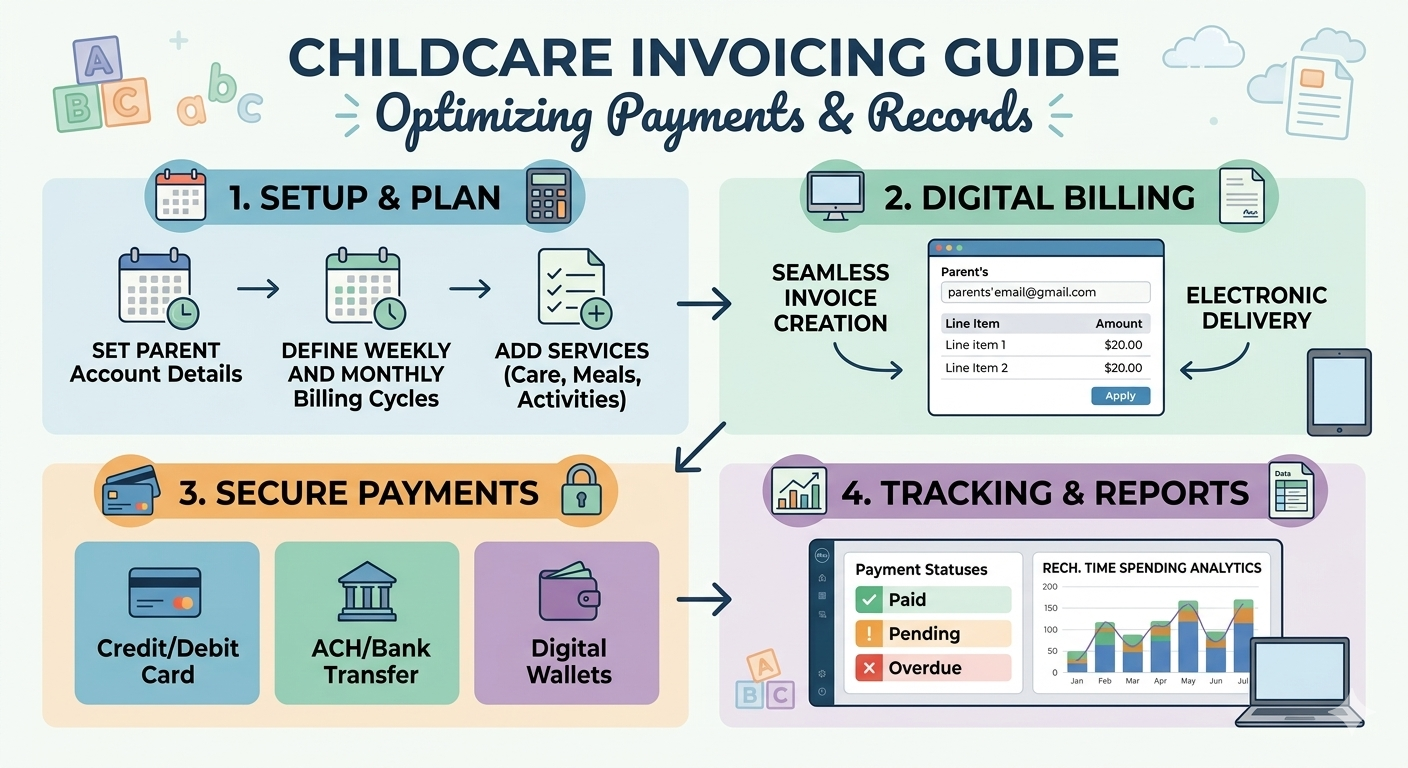
This guide provides a comprehensive framework for evaluating and selecting childcare billing software with parent payment portals. It is written for childcare center directors, preschool owners, after-school program administrators, and daycare operators seeking to automate tuition collection and invoice management. The topic matters because manually creating and managing paper invoices does not scale, leading to administrative burnout, payment delays, and reconciliation errors that undermine cash flow. EduTrak solves these challenges through an automated billing system with flexible payment support, real-time attendance syncing, PCI-compliant processing, and a parent portal designed for the fewest clicks from login to checkout.
Quick Answer: The right childcare billing software with a parent payment portal automates recurring invoicing, supports multiple payment methods including ACH and credit cards, enables autopay enrollment, and provides real-time balance visibility for both families and administrators. When evaluating options, prioritize platforms that integrate with attendance tracking to ensure accurate billing, offer flexible scheduling support (hourly, weekly, drop-in), and maintain PCI compliance to protect sensitive financial data. EduTrak meets these requirements with a unified platform that reduces manual billing work by up to 40%.
Introduction
In today’s childcare environment, parents expect the same seamless digital experience they get from any modern service provider. If your preschool or after-school care program is still chasing paper checks, managing spreadsheets, or manually generating invoices each billing cycle, your enrollment numbers will eventually reflect it.
The numbers tell a clear story. More than half of early education organizations spend 7+ hours per week on billing tasks when using manual processes. Printing, stuffing, and distributing paper invoices to 60+ families becomes a recurring sprint that pulls administrators away from classrooms, staff support, and family relationships. Meanwhile, families struggle to track their childcare expenses, often misplacing paper invoices or forgetting payment deadlines.
This guide is designed to help you move from chaos to clarity. It provides a practical evaluation framework for choosing a childcare billing system with a parent portal — one that automates invoicing, simplifies payment collection, and gives you back hours of administrative time each week.
What Makes a Great Parent Payment Portal?
A parent payment portal is not simply an online payment page. It should serve as the central hub for all family financial interactions. When evaluating platforms, look for a portal that allows parents to:
- View current and historical balances instantly without calling the office
- Make one-time or recurring payments via ACH bank transfers or credit cards
- Set up autopay to ensure bills are never missed
- Access tax statements for year-end filing
- Update payment methods as cards expire or bank accounts change
- Submit registration forms without duplicating contact information
The portal should also integrate with your student information system so parents use a single login across all school-related platforms. This frictionless experience dramatically improves parent adoption rates and reduces the number of inbound calls about account balances — one of the fastest wins administrators report after launching a portal.
What families need to know: They should never have to chase the office for a receipt or ask “Did I pay for November?” A modern portal puts that information in their hands 24/7.
The 5 Features Your Next Parent Portal Must Have
Auto-Pay via ACH and Credit Card
Autopay is a game-changer for both families and administrators. It allows parents to save a payment method on file and have tuition automatically charged each billing period. This means no more late payments, no more chasing families, and no more awkward money conversations.
Why ACH matters: ACH (Automated Clearing House) bank transfers typically carry lower processing fees than credit cards. For parents who prefer to avoid card fees, ACH is a valuable option to offer. When evaluating platforms, confirm that both ACH and credit/debit card processing are supported.
Key question for vendors: “How does autopay enrollment work from the parent’s perspective? Can they set it up themselves or does an admin need to enable it?”
Real-Time Attendance Syncing
One of the most common reasons childcare administrators switch billing platforms is the inability to connect attendance data to tuition calculations. If you offer drop-in care, hourly billing, or session-based charges, your billing software must link to attendance tracking.
What to look for:
- Automated invoice generation based on hours attended
- Batch attendance entry and editing to save time
- Support for holiday and drop-in rate adjustments
- The ability to bill before or after attendance depending on your policy
When attendance data flows directly into the billing system, you eliminate discrepancies and reduce the manual work of matching attendance records to invoices.
Flexible Hourly and Drop-In Billing Support
Childcare programs rarely fit a single billing model. You may have:
- Full-time families on weekly flat rates
- Part-time families on session-based fees
- Drop-in families charged by the hour
- After-school programs with variable attendance patterns
- Summer camps with daily or weekly rates
Your billing software must support this complexity without custom coding or manual overrides. Look for platforms that allow you to charge for childcare on an hourly, per-session, or drop-in basis.
Feature to verify: Can you set different billing rules for different programs or age groups? For example, infants might have a weekly flat rate, while school-age children use an hourly drop-in rate.
Multi-Device Tracking and Mobile Access
Administrators and parents are rarely tethered to a desk. Your chosen platform should work seamlessly across:
- Desktop computers for office staff and finance teams
- Tablets for classroom check-in and attendance
- Smartphones for parents and administrators on the go
A cloud-based platform with encrypted access and role-based user permissions ensures that everyone can manage billing data securely from any device. Parents should be able to pay tuition, view balances, and check receipts from their phone while at work or picking up their child.
Mobile Push Notification Alerts
Payment reminders and notifications reduce the need for follow-up calls. The best portals send automated notifications for:
- Invoices generated (including due dates and amounts)
- Payment confirmations (receipts delivered instantly)
- Payment failures or declined cards
- Low-balance warnings for lunch or activity accounts
Proactive communication reduces the administrative burden of chasing payments. As one administrator noted, “I don’t have any past due payments, and that has saved us so much stress.” This outcome is typically tied to automated reminders combined with autopay options.
Security Baseline: Ensuring PCI Compliance
PCI compliance is not optional for any childcare business accepting credit or debit card payments. The Payment Card Industry Data Security Standard (PCI DSS) requires encryption of cardholder data, restricted access to payment systems, regular security testing, and an incident response plan.
Beyond PCI compliance, childcare programs must consider:
- FERPA privacy obligations: Payment systems linking to student information must ensure that financial staff see only billing data, not academic records
- Role-based access controls: Limit who can view versus edit billing information to reduce risk
- Audit-friendly activity history: Maintain records of who changed an invoice or recorded a payment
- Secure data storage: Protect sensitive family financial profiles from breaches
A platform that bundles compliance into its infrastructure removes a significant burden from center directors and IT managers who would otherwise need to manage it independently.
Key question for vendors: “What is your current PCI compliance level? How do you protect cardholder data, and how do you handle incident response?”
What to Ask Before You Buy
Use these questions during demos to evaluate whether a platform truly reduces administrative burden:
- “Show me the exact steps to create tuition invoices for next month for 3 classrooms.” — Does it require manual data entry or is it automated?
- “Show me what a family sees when they have a credit, a past-due balance, and a new charge.” — Is the parent experience clear and self-serve?
- “Where would I find outstanding balances, payments received last week, and a transaction export?” — Does it offer real-time visibility and exports that don’t require manual cleanup?
- “How do you handle mid-month schedule changes or tuition adjustments?” — Can you make changes without breaking the billing cycle?
- “What payment methods do you support, and what are the processing fees for each?” — Does ACH have lower fees than credit cards? Are fees transparent?
- “How does onboarding work for a center with mixed tech comfort levels?” — Does the vendor offer hands-on training and responsive support?
- “If I accept subsidy payments, can the system track those alongside family payments?” — Mixed-payment scenarios require specific functionality.
Comparison: Key Features Across Childcare Billing Platforms
| Feature | Basic Tools | Brightwheel | Tuition Express | EduTrak |
|---|---|---|---|---|
| Automated recurring billing | Limited | Yes | Yes | Yes |
| Parent self-service portal | No | Yes | Yes | Yes |
| PCI compliant payment processing | No | Yes | Yes | Yes |
| Autopay / ACH + Credit Card | No | Yes | Yes | Yes |
| Hourly / Drop-in billing | No | Partial | Limited | Yes |
| Real-time attendance syncing | No | Yes | No | Yes |
| Sibling discounts | No | Yes | Limited | Yes |
| Subsidy and scholarship tracking | No | Partial | Limited | Yes |
| Batch payment processing | No | No | Yes | Yes |
| Event ticketing / eStore | No | No | No | Yes |
How EduTrak Simplifies Childcare Billing
EduTrak is a unified childcare billing solution used by programs of all sizes — from single-site preschools to multi-location K-12 childcare providers. The platform addresses the specific pain points of manual billing with features designed for childcare complexity.
Key capabilities include:
- Automated invoice generation based on custom billing rules — weekly, biweekly, monthly, or session-based
- Flexible billing options supporting hourly, per-session, or drop-in charges
- Parent portal access offering balance viewing, online payments, autopay enrollment, tax statements, and form submissions
- Attendance integration linking check-in data directly to invoices to eliminate discrepancies
- Batch payment processing allowing administrators to process multiple payments at once rather than one at a time
- Sibling discount automation applying family-level discounts automatically
- Subsidy tracking managing agency payments separately from family payments
- PCI compliant payment processing with encrypted access and role-based permissions
What administrators appreciate: EduTrak offers the fewest clicks from login to checkout for parents — a critical factor in adoption rates. Parents can save registration progress and return later, which is essential for busy families juggling multiple children.
“EduTrak’s advanced billing and attendance features are designed to simplify the challenging task of managing a childcare program. We make it easy to calculate fees based on student attendance, making it more efficient and cost-effective.”
Implementation Roadmap: Making the Switch
Transitioning from paper invoices to electronic billing requires careful planning. Use this roadmap to ensure a smooth rollout.
Step 1: Assess Your Current Process
Take stock of how invoices are created and delivered, how long it takes to collect payments, what tools are involved, and how much time staff spends reconciling. Clarify your goals: reduce late payments? Save staff time? Improve cash flow predictability? Knowing your baseline will help you measure the impact of your transition.
Step 2: Research and Select the Right System
Create a shortlist of platforms, compare pricing, and request demonstrations. Speak with current users to understand real-world experience. If you’re replacing multiple systems (billing, enrollment, attendance), consider an all-in-one platform that connects these workflows.
Step 3: Develop a Transition Plan
Choose an implementation strategy — either a phased rollout with a pilot group or an all-at-once switch for all families. A pilot program lets you troubleshoot with a smaller group but requires managing two billing systems for a short time. Plan your data migration carefully, transferring family contact information, payment histories, and outstanding balances.
Step 4: Train Your Staff
Host hands-on trainings or demos where staff can see how to create invoices, edit billing plans, apply credits, and send payment reminders. Assign an internal “billing lead” to take ownership of the process and serve as the internal expert.
Step 5: Communicate with Families
Start with a strong announcement explaining the changes. Include:
- When the change is happening
- How the new system benefits families (autopay, reminders, receipts, transparency)
- What they need to do (set up an account, add payment method, verify email)
Provide step-by-step instructions, FAQs addressing fees and security, and a grace period for setup questions.
Step 6: Launch the System
If you’re piloting, start with families comfortable with technology and likely to provide constructive feedback. For full rollouts, send reminder communications leading up to the go-live date.
Step 7: Monitor, Measure, and Improve
Track metrics like time spent on billing per cycle, rate of on-time payments, number of manual follow-ups, and family satisfaction. Hold a check-in after the first month to gather feedback and make refinements.
Frequently Asked Questions
How do I choose billing software with parent payment portals?
Evaluate whether the parent portal supports self-service balance viewing, online payments via ACH and credit card, autopay enrollment, tax statement downloads, and form submission. The portal should integrate with your existing student information system so parents use a single login. Confirm that the platform is PCI compliant and that the parent-facing interface is mobile-responsive.
What are the most important features in childcare billing software?
The essential features are automated invoice generation, recurring billing cycles, online payment collection, integration with attendance tracking, financial reporting, and a secure parent portal for self-service access. Automation should reduce manual workload by 30–50%.
How do I know if a billing platform is PCI compliant?
Ask the vendor directly about their current PCI DSS certification level (Level 1 is the highest). Confirm that they use encrypted payment processing, comply with data security standards, and have an incident response plan. Legitimate vendors will readily provide this information.
Can I charge for childcare on an hourly basis with EduTrak?
Yes. EduTrak supports charging for childcare on an hourly, per-session, or drop-in basis. This flexibility makes it suitable for before- and after-school programs, summer camps, and centers with variable attendance patterns.
How does autopay work for families?
Families add a payment method to their portal profile and enable autopay. On each due date, the system automatically charges the card or initiates the ACH transfer for the amount owed. The parent receives a receipt and can view the transaction in their history. Many centers frame autopay as a convenience — “set it and forget it” — to encourage enrollment.
What payment methods should a childcare billing system support?
At minimum, support for credit cards (Visa, MasterCard, American Express) and ACH bank transfers. Some families prefer ACH to avoid card fees, while others use credit cards for rewards points. Today’s parents expect digital payment options — in fact, 60% of parents pay at least half of their bills digitally.
How can I reduce the number of manual steps in my billing workflow?
Look for automated invoicing, autopay, reminders, reconciliation, and reporting. Manual steps to eliminate include printing, stuffing envelopes, data entry, and cross-referencing spreadsheets. Centers that automate billing with software save an average of 20 hours per month.
Is EduTrak secure and accessible from any device?
EduTrak’s cloud-based platform offers encrypted access with role-based user permissions. Administrators, staff, and families can manage data securely from desktops, tablets, or smartphones. The platform is PCI compliant and designed to meet FERPA privacy obligations.
Key Takeaways
- Manual billing does not scale. Centers spending 7+ hours per week on billing are prime candidates for automation.
- A parent portal is not just an online payment page. It should offer balance viewing, autopay enrollment, tax statements, and form submissions — all in one place.
- The 5 must-have features are autopay, attendance syncing, flexible billing (hourly/drop-in), multi-device support, and mobile push notifications.
- PCI compliance is mandatory. Cardholder data must be encrypted, access controlled, and breach response documented.
- Ask vendors for real demos. Don’t accept “yes” answers without seeing the actual workflow for invoicing, adjustments, and reporting.
- Implement in phases. Pilot with tech-savvy families, train staff thoroughly, and communicate early and often with parents.
- EduTrak unifies billing, attendance, and parent communication in a single platform — eliminating fragmented workflows and manual reconciliation.
Conclusion
Your childcare program deserves better than chasing paper checks and managing spreadsheets. The right automated billing software with a parent payment portal transforms a stressful, time-consuming process into a smooth, predictable workflow that benefits your staff, your families, and your bottom line.
When evaluating options, prioritize platforms that handle the complexity of childcare billing: flexible schedules (hourly, drop-in, session-based), sibling discounts, subsidy tracking, and real-time attendance integration. Ensure the parent portal is intuitive enough that families can set up autopay, view balances, and download tax statements without contacting the office.
EduTrak offers a complete solution purpose-built for childcare programs, preschools, and after-school care. With automated billing, flexible payment support, and a parent portal designed for the fewest clicks from login to checkout, EduTrak helps you eliminate manual billing work, improve on-time payments, and focus more time on what matters most — caring for children.
Ready to see the difference? Compare EduTrak’s flexible child care payment modules side-by-side with your current system at edutrak.com/child-care or request a demo tailored to your program’s specific billing needs.
Sources and Further Reading
EduTrak Resources:
- Childcare Billing Software Solution: edutrak.com/child-care
- Streamline K-12 Childcare Billing: edutrak.com/streamline-k-12-childcare-billing
- Best Automated Tuition Billing System for Small Schools: edutrak.com/best-automated-tuition-billing-system-for-small-schools-in-2025-2026
Third-Party Evaluation Guides:
- Brightwheel — How to Evaluate Childcare Software: mybrightwheel.com
- Software Advice — Tuition Express Features & Pricing: softwareadvice.com
- Worldpay for Platforms — Payment Solutions for Education: platforms.worldpay.com
Industry References:
- PCI Security Standards Council — PCI DSS v4.0: pcisecuritystandards.org
- National Association for the Education of Young Children (NAEYC) — Business Practices: naeyc.org
Last updated: July 2026. Features and pricing subject to change. Visit edutrak.com for current information.